Take
Choose First Class or Premium, tap a seat, then add drinks, First Class food choices, or a passenger-specific service note.
 Cabin Drinks
Built for inflight service
Tap a seat, add drinks, food, or a free-form note, prepare everything in the galley, then deliver from a cabin view that matches the direction you’re walking. Once installed, it works without an internet connection.
No account. No passenger names. Orders stay on your device.
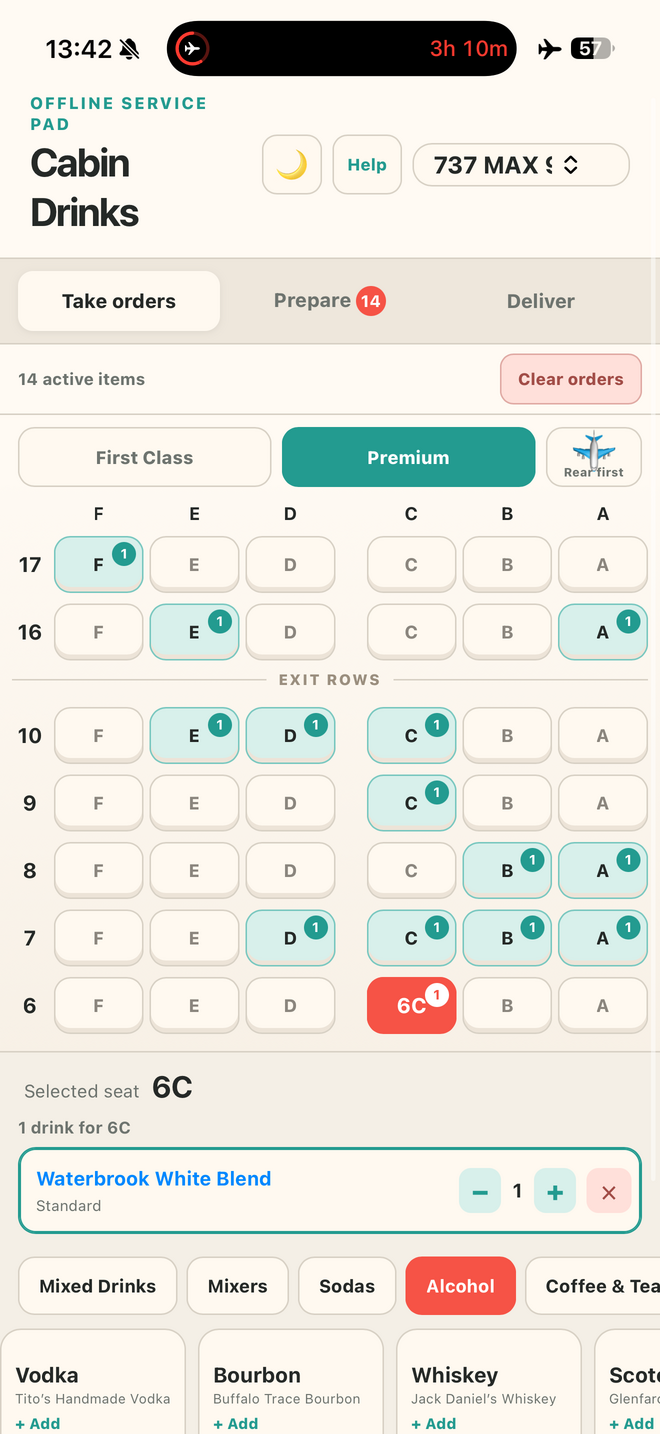
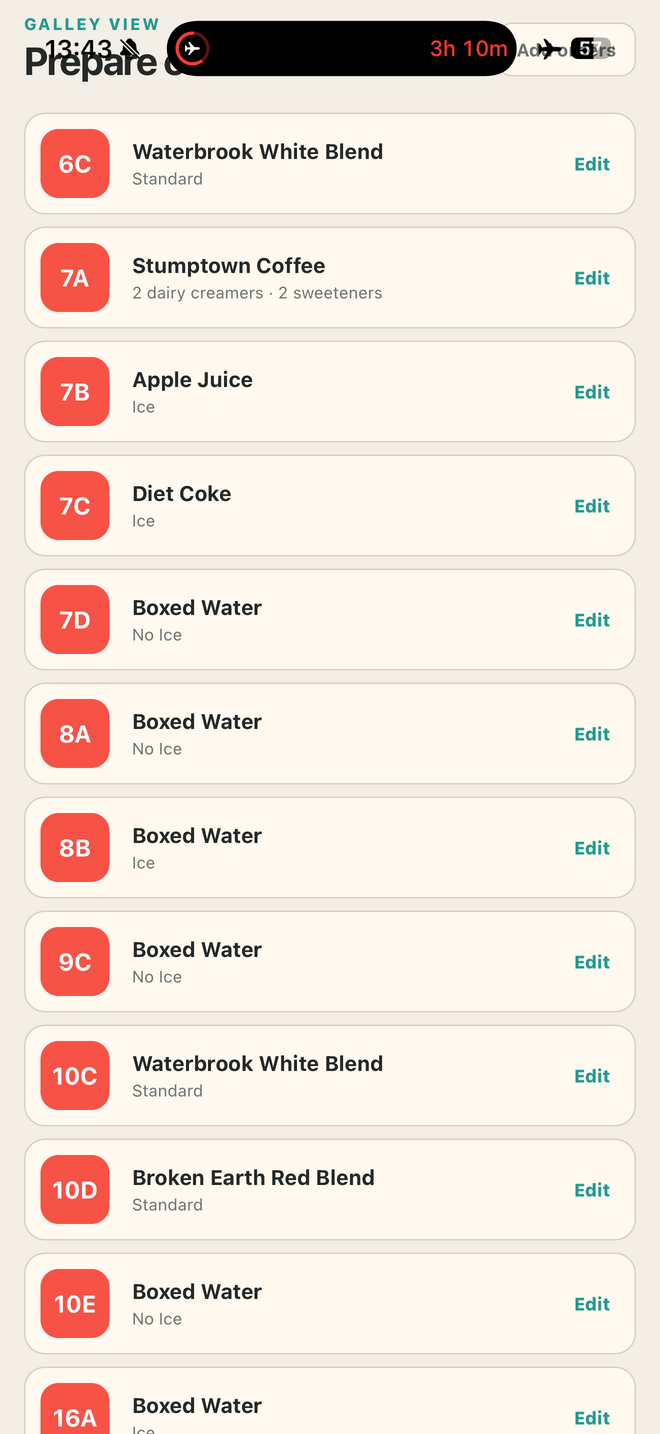
Choose First Class or Premium, tap a seat, then add drinks, First Class food choices, or a passenger-specific service note.
See food tallies, seat notes, and complete galley instructions grouped by seat, including quantities and modifiers.
Follow the cabin-shaped map in your walking direction and confirm each food-and-beverage order as it is delivered.
New in Version 19
Delivery now mirrors the physical cabin and the direction you’re walking. From the forward galley, F stays on your left, A stays on your right, and each row appears in service order.
First Class setup
Take a photo of the printed First Class menu and AI reads the food item names for you. Fix anything that’s off, set today’s loaded quantity, remove what doesn’t belong, and add anything it missed—nothing goes on the menu until you confirm.
See how it worksImproved by crew feedback
Requests from working crew continue to make Cabin Drinks quicker to navigate, clearer in the galley, and more dependable when the cabin goes offline.
Crew reaction
Cabin Drinks began as one flight attendant’s workaround. Within days, crew members were downloading it, trying it inflight, and helping shape what came next.
“I’ve used this every flight since learning about it — it’s chef’s kiss.”
“Game changer!”
“This is what I’ve been wanting for so long. It would make our job so much easier.”
“This is genius!”
“Can’t wait to use it tonight.”
“Downloading now! This is so cool.”
“Thank you for putting something functional together for us to use.”
Install on your phone
Tap the button and Cabin Drinks will show only the instructions for your device. Once its files are safely stored, you’ll see an Offline Ready confirmation.
Quick start
Select the aircraft, cabin, and walking direction. In First Class, set up today’s food inventory.
Tap a seat and add each requested food item, drink, or service note.
Use Common Drinks or Build Your Own for mixed combinations.
Open Prepare for galley totals, then Deliver when you return to the cabin.
FROM ONE FLIGHT ATTENDANT TO ANOTHER
…but if we’ve worked a flight together, you probably know me as Elio.
Cabin Drinks started as something I built for myself to make beverage and meal service a little less chaotic.
Thanks to ideas from other crew members, it’s grown into a tool that’s constantly evolving to make our jobs a little easier.
When I’m not flying, you’ll usually find me behind a camera covering sporting events around the world.
Support Cabin Drinks
Cabin Drinks stays free, with no ads and no account required. If you’d like to help keep it that way, Layover Larry is an enamel pin shaped like the ice mallet you already reach for during drink service — made by the same person building this app. His travel companion, Roxie the Carry-On, is along for the ride too.
Shop the pins ↗
Built one flight at a time
See how Cabin Drinks grew from a simple seat-and-drink pad into a complete offline service companion.
The service flow now handles the requests that do not fit neatly on a beverage menu—and the delivery screen looks like the cabin in front of you.
A clearer two-sided delivery map with an unmistakable aisle and cabin-side guidance.
Introduced seat notes and replaced the linear delivery list with row-by-row First Class and Premium maps.
Custom drink labels now follow the actual spirit and mixer selected—including sparkling wine combinations.
Photograph a printed menu, review the detected items, and confirm loaded quantities before service.
A guided, device-aware installation and a clearer guarantee that Cabin Drinks is ready to fly.
A clearer reset and a smoother First Class food setup on iPhone.
Less hunting, less horizontal scrolling, and stronger offline reliability.
Replace the paper meal tally with a live, flight-specific inventory.
A calmer, clearer experience for overnight service.
The reversed map now matches what crew actually see while walking the aisle.
Help improve it
Cabin Drinks was created by Zach as an independent crew tool. Tell me what would make it more useful on your flights.
zach@hizach.comInstall on iPhone
After adding it to your Home Screen, launch Cabin Drinks once while online to finish offline setup.
