Built for inflight service

Version 19 · Current FAQ

Take food & drink orders.
Skip the scribbled notes.

Tap a seat, add drinks, food, or a free-form note, prepare everything in the galley, then deliver from a cabin view that matches the direction you’re walking. Once installed, it works without an internet connection.

Open Cabin Drinks

No account. No passenger names. Orders stay on your device.

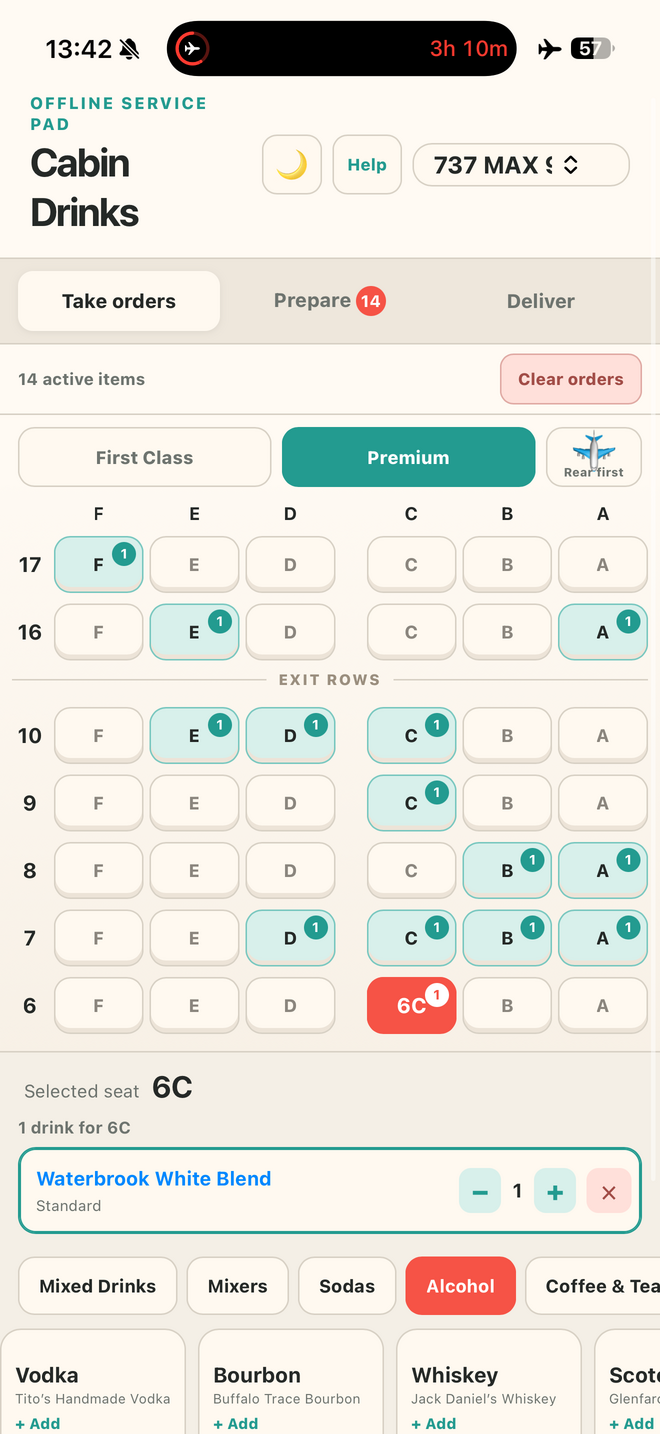
Cabin Drinks Premium seat map with active beverage orders
Take orders by seat
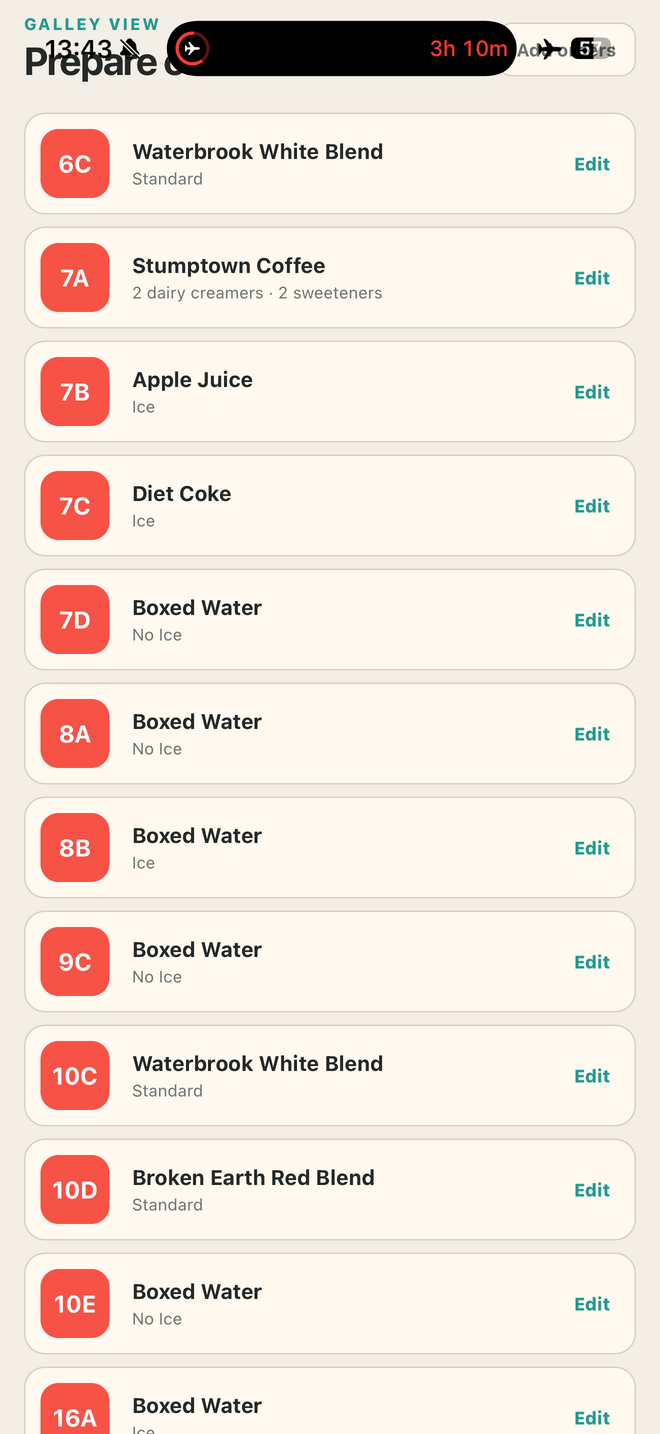
Cabin Drinks galley preparation list with seats and drink modifiers
Prepare everything in the galley
01

Take

Choose First Class or Premium, tap a seat, then add drinks, First Class food choices, or a passenger-specific service note.
02

Prepare

See food tallies, seat notes, and complete galley instructions grouped by seat, including quantities and modifiers.

03

Deliver

Follow the cabin-shaped map in your walking direction and confirm each food-and-beverage order as it is delivered.

New in Version 19

Glance down. Know exactly where to go.

Delivery now mirrors the physical cabin and the direction you’re walking. From the forward galley, F stays on your left, A stays on your right, and each row appears in service order.

✓ First Class & Premium✓ Front or rear first✓ Notes stay with the seat
Your leftAisleYour right
Row 1
1FCoca-ColaIce
1APolar SeltzerStandard
1DMimosaSparkling Wine · Orange Juice
1CSeat noteExtra time

First Class setup

Scan a menu instead of typing it in.

Take a photo of the printed First Class menu and AI reads the food item names for you. Fix anything that’s off, set today’s loaded quantity, remove what doesn’t belong, and add anything it missed—nothing goes on the menu until you confirm.

See how it works

Improved by crew feedback

Built around how service actually happens.

Requests from working crew continue to make Cabin Drinks quicker to navigate, clearer in the galley, and more dependable when the cabin goes offline.

Seat-by-seat notes Save unusual requests or service reminders even when no drink is ordered.
Cabin-shaped delivery Orders stay on the correct side of the aisle for the direction you’re walking.
First Class food tally Load today’s choices, assign seats, and watch inventory update.
Complete modifiers Creamers, sweeteners, ice, citrus, doubles, and coffee additions stay with the order.
Multiple drinks per seat Keep every beverage, quantity, and custom mixed drink together.
Airplane-mode ready A strengthened offline launch keeps the installed app available inflight.

Crew reaction

The galley is talking.

Cabin Drinks began as one flight attendant’s workaround. Within days, crew members were downloading it, trying it inflight, and helping shape what came next.

Anonymous crew member

“Game changer!”

Anonymous crew member

“This is what I’ve been wanting for so long. It would make our job so much easier.”

Anonymous crew member

“This is genius!”

Anonymous crew member

“Can’t wait to use it tonight.”

Anonymous crew member

“Downloading now! This is so cool.”

Anonymous crew member

“Thank you for putting something functional together for us to use.”

Install on your phone

Ready for airplane mode

Tap the button and Cabin Drinks will show only the instructions for your device. Once its files are safely stored, you’ll see an Offline Ready confirmation.

Cabin DrinksFast access · Full screen · Works offline
Install, then launch once while online
✓ No App Store✓ No account✓ Automatic updates

Quick start

From seat map to service

1

Select the aircraft, cabin, and walking direction. In First Class, set up today’s food inventory.

2

Tap a seat and add each requested food item, drink, or service note.

3

Use Common Drinks or Build Your Own for mixed combinations.

4

Open Prepare for galley totals, then Deliver when you return to the cabin.

FROM ONE FLIGHT ATTENDANT TO ANOTHER

Hi, I’m Zach.

…but if we’ve worked a flight together, you probably know me as Elio.

Cabin Drinks started as something I built for myself to make beverage and meal service a little less chaotic.

Thanks to ideas from other crew members, it’s grown into a tool that’s constantly evolving to make our jobs a little easier.

When I’m not flying, you’ll usually find me behind a camera covering sporting events around the world.

Support Cabin Drinks

Grab a Layover Larry pin.

Cabin Drinks stays free, with no ads and no account required. If you’d like to help keep it that way, Layover Larry is an enamel pin shaped like the ice mallet you already reach for during drink service — made by the same person building this app. His travel companion, Roxie the Carry-On, is along for the ride too.

Shop the pins ↗

Layover Larry enamel pin, shaped like a teal ice mallet

Built one flight at a time

Version History

See how Cabin Drinks grew from a simple seat-and-drink pad into a complete offline service companion.

Version 19Seat Notes & Cabin DeliveryCurrent

The service flow now handles the requests that do not fit neatly on a beverage menu—and the delivery screen looks like the cabin in front of you.

  • Free-form notes saved to any First Class or Premium seat
  • Notes remain visible in Prepare and Deliver
  • Delivery is grouped by row and split across a visible aisle
  • The layout follows the same walking direction selected on the seat map
  • “Your left · Aisle · Your right” orientation for faster glances
View previous versionsVersions 18–1
Version 18Cabin Side LabelsSeptember 2026

A clearer two-sided delivery map with an unmistakable aisle and cabin-side guidance.

Version 17Notes & Delivery LayoutSeptember 2026

Introduced seat notes and replaced the linear delivery list with row-by-row First Class and Premium maps.

Version 16Accurate Mixed-Drink NamesSeptember 2026

Custom drink labels now follow the actual spirit and mixer selected—including sparkling wine combinations.

Version 15Scan the First Class MenuJuly 2026

Photograph a printed menu, review the detected items, and confirm loaded quantities before service.

Version 14Easy Install & UpdatesJuly 2026

A guided, device-aware installation and a clearer guarantee that Cabin Drinks is ready to fly.

  • One prominent install action with iPhone-specific guidance
  • Offline Ready status confirms required files are stored
  • Automatic update checks on launch, reconnect, and return to the app
  • New versions activate cleanly while saved orders remain on the device
Version 13 Fresh Flight Reset July 2026

A clearer reset and a smoother First Class food setup on iPhone.

  • New Clear All option removes orders, reservations, and the loaded food menu
  • Clear Orders remains available when the same food menu should be reused
  • Visible version badge inside the app
  • Food inputs no longer trigger unwanted iPhone zoom
  • Larger, more responsive meal quantity controls
Version 12 Faster Service July 2026

Less hunting, less horizontal scrolling, and stronger offline reliability.

  • Juice & Water and Coffee & Teas moved to the front
  • Larger, scroll-free category grid
  • Coffee additions for Irish cream and hazelnut espresso vodka
  • Improved iPhone food-quantity controls and Home Screen offline launch
  • Common mixed-drink editors moved directly beneath their recipes
Version 11 First Class Food July 2026

Replace the paper meal tally with a live, flight-specific inventory.

  • Custom food menu and loaded quantities for First Class
  • Reserve food by seat with automatic remaining counts
  • Sold-out protection plus food tallies in Prepare and Deliver
Version 10 Redeye Ready July 2026

A calmer, clearer experience for overnight service.

  • Dark mode with a remembered sun/moon setting
  • Drink orders and modifiers are more prominent in Delivery
  • “Tap when delivered” guidance is intentionally quieter
Version 9 Correct Cabin View July 2026

The reversed map now matches what crew actually see while walking the aisle.

  • Forward view remains ABC · DEF
  • Reverse view displays FED · CBA
  • First Class reverse view displays FD · CA
Version 8 Delivery Confidence July 2026
  • Airplane control reverses the row sequence
  • Delivery cards show creams, sugars, and every modifier
  • More complete handoff details before marking a seat delivered
Version 7 Coffee & Tea Polish July 2026
  • Cleaner Jasmine Green Tea label and coffee-specific modifiers
  • Dairy or oat milk with quantities
  • Sugar or sweetener with quantities
  • Clear Orders moved to the top of the main screen
Version 6 Ready to Share July 2026
  • New public landing page and installation guide
  • Quick-start instructions and help
  • Share, email contact, and feedback options
Version 5 Mixed Drinks July 2026
  • Build Your Own mixed-drink workflow
  • Bloody Mary quick build
  • Lemon, lime, and grapefruit citrus packets
Version 4 First Class July 2026
  • First Class and Premium cabin switcher
  • Rows 1–4 with AC · DF seating
  • Repeated taps add quantities, including double spirits
Version 3 Multiple Drinks July 2026
  • More than one drink per seat
  • Dairy and oat milk choices
  • Cream and sugar quantities
  • Existing saved orders migrated to the new format
Version 2 Public & Offline July 2026
  • Installable offline web app at drinks.hizach.com
  • Aircraft selection and premium exit-row layouts
  • Branded onboard beverage menu
Version 1 First Prototype July 2026
  • Tap a seat, then choose a drink
  • Prepare and Deliver views
  • Orders stored locally on the device
Pet NiaSupport Cabin Drinks

Help improve it

Questions or feedback?

Cabin Drinks was created by Zach as an independent crew tool. Tell me what would make it more useful on your flights.

zach@hizach.com
This opens your email app so you can review the message before sending.